

 4/8/12 HDMI IPTV Encoder and Streamer
 4/8/12 HDMI IPTV Encoder and Streamer
EMU-9500
BLANKOM EMU-9500 offers 4, 8 or 12 HDMI inputs with H.265/H.264 encoding and SPTS IP distribution. Each four-input encoding module has format-dependent processing capacity; full-frame-rate H.264 capacity differs from H.265.
Ordering Guide
- Logo/text/QR insertion must be specified when ordering
- Select 4/8/12 inputs, required codec/resolution/fps per channel, output protocols and optional OSD
Technical Overview
EMU-9504, EMU-9508 and EMU-9512 provide one, two or three four-input modules. For each module, the specification lists four 1080p50/60 HEVC outputs but only two 1080p50/60 H.264 outputs. Four 720p50/60 H.264 outputs are specified. Input count must therefore be distinguished from simultaneous encoded format capacity.
Each channel is delivered as an SPTS, rather than an RF-modulated carrier. The IP output includes UDP, SRT and common streaming protocols. Network design must include all enabled services, their audio, transport overhead and the actual uplink capacity.
De-interlacing, noise reduction and sharpening are listed preprocessing functions. Logo, text and QR overlays are ordering options, not an assumed standard licence. The browser interface controls the unit and supports Ethernet firmware updates.
At a Glance
INPUT
- HDMI inputs: EMU-9504: 4; EMU-9508: 8; EMU-9512: 12; HDCP 1.4
OUTPUT
- IP output: SPTS: UDP, SRT, RTP, RTSP, RTMP, HTTP, HLS; unicast/multicast; IPv4/IPv6
FEATURES
- Video codecs: HEVC/H.265; MPEG-4 AVC/H.264; 4:2:0
- Video parameters: 0.5–20 Mbps per channel; CBR/VBR; GOP IBBP/IPPP
- Processing: De-interlacing, noise reduction, sharpening
- Audio: MPEG-1 Layer II, LC-AAC, HE-AAC, HE-AAC v2, AC-3 pass-through; 48 kHz
- Network and management: 100/1000Base-T; Web management, English interface; Ethernet firmware upgrade; IP null-packet filter
Ordering Guide
- Overlay option: Logo/text/QR insertion must be specified when ordering
- Ordering: Select 4/8/12 inputs, required codec/resolution/fps per channel, output protocols and optional OSD
Key Features
- Video codecs: HEVC/H.265; MPEG-4 AVC/H.264; 4:2:0
- Video parameters: 0.5–20 Mbps per channel; CBR/VBR; GOP IBBP/IPPP
- Processing: De-interlacing, noise reduction, sharpening
- Audio: MPEG-1 Layer II, LC-AAC, HE-AAC, HE-AAC v2, AC-3 pass-through; 48 kHz
- Network and management: 100/1000Base-T; Web management, English interface; Ethernet firmware upgrade; IP null-packet filter
System Diagram
Functional signal path
4/8/12 HDMI IPTV Encoder → IP SPTS distribution
Typical Applications
Multi-channel IPTV headend
Encode compatible HDMI sources as separate SPTS services. Choose H.265 or H.264 capacity from the actual resolution table, then size the Ethernet uplink for the selected channel set.
Venue or campus TV
Deliver local information and programme sources to managed IP receivers. Multicast deployment requires an appropriately configured switching network and compatible decoders.
Remote service delivery
Use SRT or another supported protocol for a compatible remote receiver. Assess WAN capacity for the aggregate streams; an interface speed is not a guaranteed usable end-to-end rate.
Model Comparison
| Model | Configuration |
|---|---|
| EMU-9504 | 4 HDMI / 1 encoding module |
| EMU-9508 | 8 HDMI / 2 encoding modules |
| EMU-9512 | 12 HDMI / 3 encoding modules |
Product Images
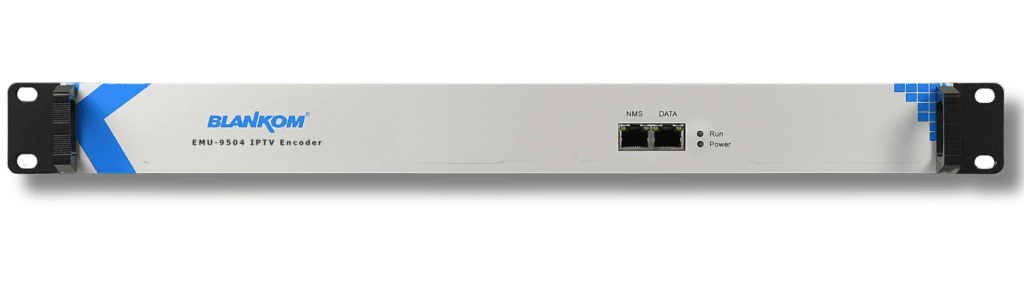
Family reference illustration; the depicted housing or model may differ from the selected variant.
Technical Specifications
| Parameter | Specification |
|---|---|
| HDMI inputs | EMU-9504: 4; EMU-9508: 8; EMU-9512: 12; HDCP 1.4 |
| Video codecs | HEVC/H.265; MPEG-4 AVC/H.264; 4:2:0 |
| 1080p50/60 per module | H.265: 4 channels; H.264: 2 channels |
| 720p50/60 per module | 4 channels in H.265 or H.264 |
| Video parameters | 0.5–20 Mbps per channel; CBR/VBR; GOP IBBP/IPPP |
| Processing | De-interlacing, noise reduction, sharpening |
| IP output | SPTS: UDP, SRT, RTP, RTSP, RTMP, HTTP, HLS; unicast/multicast; IPv4/IPv6 |
| Audio | MPEG-1 Layer II, LC-AAC, HE-AAC, HE-AAC v2, AC-3 pass-through; 48 kHz |
| Audio bitrates | Layer II/LC-AAC: 48–384 kbps; HE-AAC: 24–128 kbps; HE-AAC v2: 18–56 kbps |
| Network and management | 100/1000Base-T; Web management, English interface; Ethernet firmware upgrade; IP null-packet filter |
| Overlay option | Logo/text/QR insertion must be specified when ordering |
| Mechanical and power | 482 × 328 × 44 mm; approximately 5 kg; AC 100–220 V ±10%, 50/60 Hz |
| Ordering | Select 4/8/12 inputs, required codec/resolution/fps per channel, output protocols and optional OSD |
The listed values follow the official technical reference. Select the required model and configuration before ordering.
Technical FAQ
1. What distinguishes the three models?
HDMI inputs: EMU-9504: 4; EMU-9508: 8; EMU-9512: 12; HDCP 1.4.
2. Can every HDMI input encode 1080p60 in H.264?
1080p50/60 per module: H.265: 4 channels; H.264: 2 channels.
3. What is the 720p capacity?
720p50/60 per module: 4 channels in H.265 or H.264.
4. Which video settings control bandwidth?
Video codecs: HEVC/H.265; MPEG-4 AVC/H.264; 4:2:0. Video parameters: 0.5–20 Mbps per channel; CBR/VBR; GOP IBBP/IPPP.
5. Does the unit output RF carriers?
No RF modulator output is specified. The unit provides IP SPTS services over the listed protocols.
6. Which audio codecs are listed?
Audio: MPEG-1 Layer II, LC-AAC, HE-AAC, HE-AAC v2, AC-3 pass-through; 48 kHz. Audio bitrates: Layer II/LC-AAC: 48–384 kbps; HE-AAC: 24–128 kbps; HE-AAC v2: 18–56 kbps.
7. Which image preprocessing functions are available?
Processing: De-interlacing, noise reduction, sharpening.
8. Are logo and QR overlays standard?
Overlay option: Logo/text/QR insertion must be specified when ordering.
9. How is the encoder managed?
Network and management: 100/1000Base-T; Web management, English interface; Ethernet firmware upgrade; IP null-packet filter.
10. What should be specified for an order?
Mechanical and power: 482 × 328 × 44 mm; approximately 5 kg; AC 100–220 V ±10%, 50/60 Hz. Ordering: Select 4/8/12 inputs, required codec/resolution/fps per channel, output protocols and optional OSD.
Downloads
For the current documentation and configuration, use the official product reference or request the required data sheet.